Start with one defined task
We identify a repetitive process, its starting event and the result you need. A focused scope makes it easier to explain what the automation does and to check whether it works as agreed.

Connect the tools your business already uses and reduce repeated sorting, copying and follow-up tasks. Lumy builds defined automations, with practical AI assistance and human review where the agreed workflow needs it.
From $299 one-time · Introductory starting rates in USD
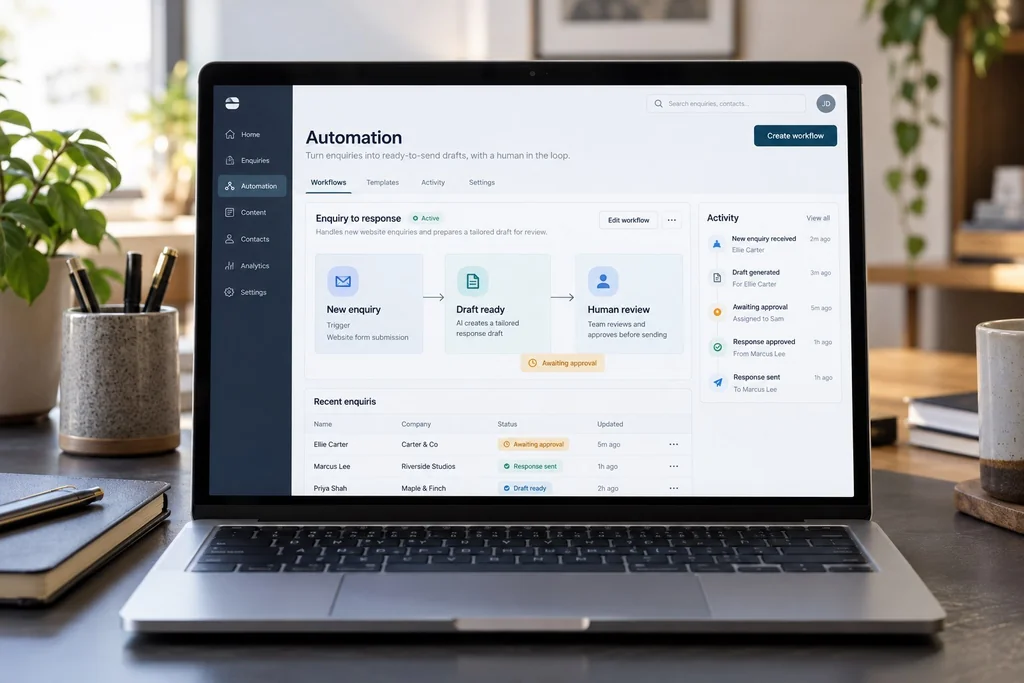
Suitable starting points include moving website enquiries into a supported CRM or spreadsheet, sending an internal notification, organizing incoming information, or preparing a draft for a person to review. Feasibility depends on your apps, permissions and the information available. Quick Win starts at $299 USD for one simple workflow with up to two supported apps. AI functionality is included only where specified, such as Smart’s one AI-assisted step.
We identify a repetitive process, its starting event and the result you need. A focused scope makes it easier to explain what the automation does and to check whether it works as agreed.
We assess the available integrations and permissions before promising a connection. API limits, paid plans and the quality of your existing data can affect feasibility and running costs.
We map conditions, exceptions and any approval checkpoints before deployment. AI-generated drafts need review where agreed; the system is not sold as an unrestricted autonomous employee.
An illustrative workflow could capture a form submission, organize the enquiry, prepare a draft response and wait for the owner’s approval before sending. This is a possible scoped use case, not a feature included in every package. The proposal identifies external actions, approval requirements and what happens when a connection fails or the information is incomplete.
Explore the workflow demonstration$299 one-time
One simple workflow, up to two supported apps, triggers and actions, testing and setup, one revision round and seven days of bug-fix support.
Discuss Quick Win$599 one-time
One business workflow, up to three supported apps, conditional logic, error notifications, testing and deployment, and two revision rounds.
Discuss Automate$1,199+ one-time
Up to two related workflows, up to three supported apps, one AI-assisted step, human approval controls, basic execution logging and two revision rounds.
Discuss SmartIntroductory starting rates in USD. Final scope, payment terms and delivery schedule are confirmed in your proposal. Third-party subscriptions, hosting and usage costs are separate. See full package details and exclusions →
We review the current process, supported tools, permissions and expected volume. Your proposal defines the workflow, exclusions, running costs and support terms.
We connect the agreed tools and test the defined triggers, actions and conditions. You review the workflow within the included revision rounds.
We arrange deployment and explain the workflow, account responsibilities and support options. Approval checkpoints and external actions are confirmed before launch.
Our automation concept illustrates capture, draft preparation and human review in a business workspace. The workflow on the homepage can be played as a demonstration without sending anything. It is not a customer system or a measured time-saving case study.
View our concept workNo. Many useful automations use straightforward triggers, actions and rules. Quick Win and Automate do not include an AI-assisted step. Smart includes one defined AI-assisted step, alongside the listed human approval controls and basic logging.
Automation hosting, third-party subscriptions, API fees and AI-model usage are separate from the implementation price. Your tools, usage volume and workflow determine these costs. We identify relevant dependencies before you proceed; optional maintenance is also separate.
Connections depend on supported integrations or an accessible API, appropriate account permissions and any plan restrictions. We assess your tools during discovery. Unsupported apps, custom integrations and advanced agents require separate scoping.
We agree the error handling and support appropriate to your package. Automate includes error notifications; Smart includes basic execution logging. Connections can fail because of expired credentials, changed APIs or provider limits, so an ongoing support arrangement may be useful.
The proposal defines external actions and the approvals they require. Smart includes human approval controls. We discuss which actions may run automatically and which must wait for review, rather than assume unrestricted permission.
Quick Win includes seven days of bug-fix support. Other project support periods are confirmed in the proposal. Optional automation care starts at $149 per month with defined service time; subscriptions and usage costs are separate, and these plans do not include 24/7 emergency support.
Tell me about your business and what you want to improve. We’ll discuss the scope before any work begins.